• SAMPLE AUDIT · SELF-INITIATED · 7 OCTOBER 2026
Geckoboard: from signup to a first working widget
ProductGeckoboard, a tool for building KPI dashboards.
PersonaA Head of Support, not a dashboard specialist, setting up a first dashboard to track open tickets, response time and satisfaction.
FlowFrom the signup form to a first widget showing correct data from the team's spreadsheet.
Why it mattersIf someone like this can't get a working widget in the trial, they don't see the value, and they don't convert to paid. The metric it affects is trial-to-paid conversion.
How I ran itSelf-initiated, nobody at Geckoboard asked for it. A standard free trial, with sample data I created myself: a Google Sheet of 175 support tickets over 60 days.
Want this for your product?
• THE VERDICT
Getting started is quick. However, the first widget cannot display open tickets, and it gives no indication that the data is incomplete.
• FINDINGS
What to fix first
01The first widget can't show what the user asked for. There's no way to show only open tickets.Major
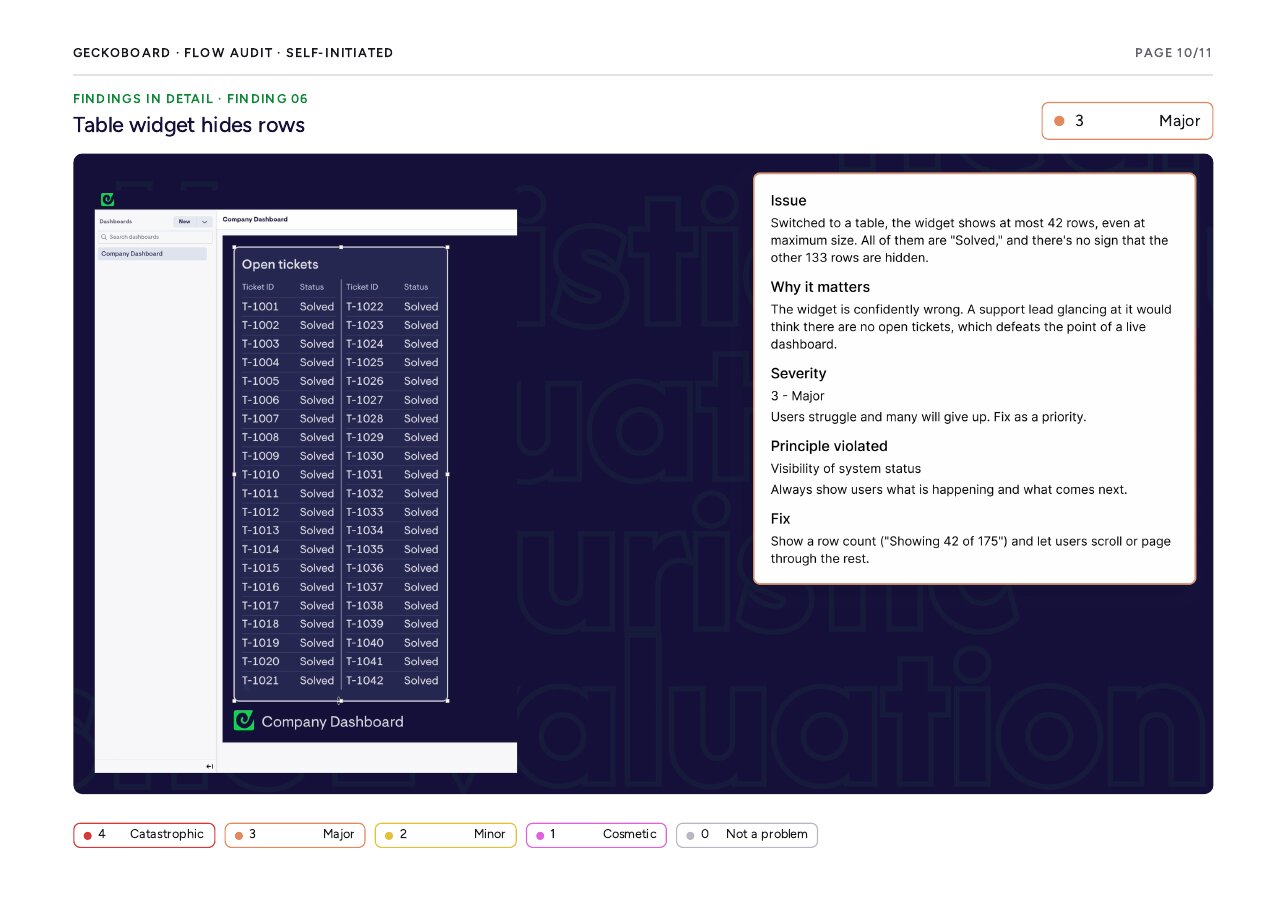
02The table widget shows 42 rows, all “Solved”, with no sign the other 133 are hidden.Major
03The setup questions don't say why the data is needed, so users skip them.Minor
04Users land on “Connect your data” with no idea why they're there or what comes next.Minor
0590+ data sources in one list, with no way to narrow by type.Minor
06The spreadsheet link error doesn't say why it failed or what to try next.Minor
• HOW A FINDING IS REPORTED
What breaks
Switched to a table, the widget shows at most 42 rows, all “Solved”, with no sign the other 133 are hidden.
Why it matters
The widget is confidently wrong. A support lead glancing at it would think there are no open tickets.
The fix
Show a row count (“Showing 42 of 175”) and let users scroll or page through the rest.
• WHAT WORKS WELL
✓ Short signup: four fields, phone optional, no card needed. Getting in takes under a minute.
✓ Clear location in the widget editor: the breadcrumb always shows where you are and offers an easy way back.
✓ Support offered when a data source isn't listed, so users know who to ask.